
Payment
The Payment block collects money when someone submits your form, for example a ticket, a fee or a deposit. You can charge a fixed amount or an amount worked out from the answers.
If you don't see this block, it isn't available on your account yet.
What your respondent sees
- An "Order summary" card with the amount. It appears only after they have entered their billing email. If the amount is calculated, it appears once all the answers it needs are filled in.
- The Submit button changes to "Submit & pay ₹X", with a "Secured payment" line and the options UPI, Cards, Netbanking and Wallets.
- Payment happens when they submit, after everything else on the form checks out.
- If they cancel, they see "Payment cancelled. You have not been charged and your form was not submitted."
Connections
- One input at the top and one output at the bottom.
- A form path can have only one Payment block.
- A Payment block can't sit inside a Repeat block's loop body. The editor refuses the connection: "Payment steps cannot be placed inside loop blocks."
- It must come after the Email question it uses, and after the Calculation block if the amount is calculated.
How to add a payment
- Add an Email Input question that asks for the person's email, and tick Mandatory Required field.
- Click Payment in the Add to form list, or hover a block, click the + below it and choose Add Payment Step.
- Connect the Email question to the Payment block, and the Payment block to the next block.
- Fill in Product / Service Label.
- Choose Pricing Amount Type and set the amount.
- Choose Platform fee paid by.
- Choose your email question in Billing Email Source.
- Set up payouts, then publish.
Settings
| Setting | What it does | Options / default |
|---|---|---|
| Title | The block's name for you. | Text. New blocks are named "Payment Step". |
| Product / Service Label | What the person is paying for. It appears on their order summary. | Text, required. Default "Product / Service". |
| Pricing Amount Type | Where the price comes from. | "Static Flat Amount" (default) or "Arithmetic Calculation Block". |
| Amount (INR) | The fixed price. Shown for a static amount. | Up to 2 decimal places. Must be more than 0. At most ₹10,00,000. Default 499.00. |
| Amount Arithmetic block | The Calculation block whose result is the price. Shown for a calculated amount. Only Calculation blocks before this block are listed. | "Select arithmetic block…", or "No upstream arithmetic blocks" until you connect one. |
| Currency Code | The currency of the payment. | INR only. |
| Platform fee paid by | Who covers GrabUrPass's fee on this payment. | "Form creator (deducted from your payout)" or "Submitter (added on top of the price)". New blocks start with Submitter. Blocks made before this setting existed count as Form creator. |
| Billing Email Source | The Email question whose answer is used as the payer's billing email. Only Email questions before this block are listed. | "Select email field…", or "No upstream email fields" until you connect one. Required. |
Static or calculated amount
- Static Flat Amount: everyone pays the same price. Type it in Amount (INR).
- Arithmetic Calculation Block: the price depends on the answers, such as tickets times a rate. Build the sum in a Calculation block, then pick it here.
Write the calculation in rupees. A result of 1500 means ₹1,500. Amounts are rounded to the nearest paisa.
Who pays the platform fee
The platform fee is 5% of the price, or 3% on the Pro plan. The payment gateway fee and 18% GST on the platform fee are added to it. See Fees. Take a ₹500 ticket at 5%, so the total fee is ₹41.01 for the creator-pays option and ₹41.97 for the submitter-pays option.
| You choose | Your respondent pays | You receive |
|---|---|---|
| Form creator (deducted from your payout) | ₹500 | ₹458.99 |
| Submitter (added on top of the price) | ₹541.97. They see the price, a "Platform & processing fee" line and the "Total payable". | ₹500 |
On the Pro plan the fee is 3%, so the same ₹500 ticket has a ₹29.21 fee (creator pays) or ₹29.89 (submitter pays).
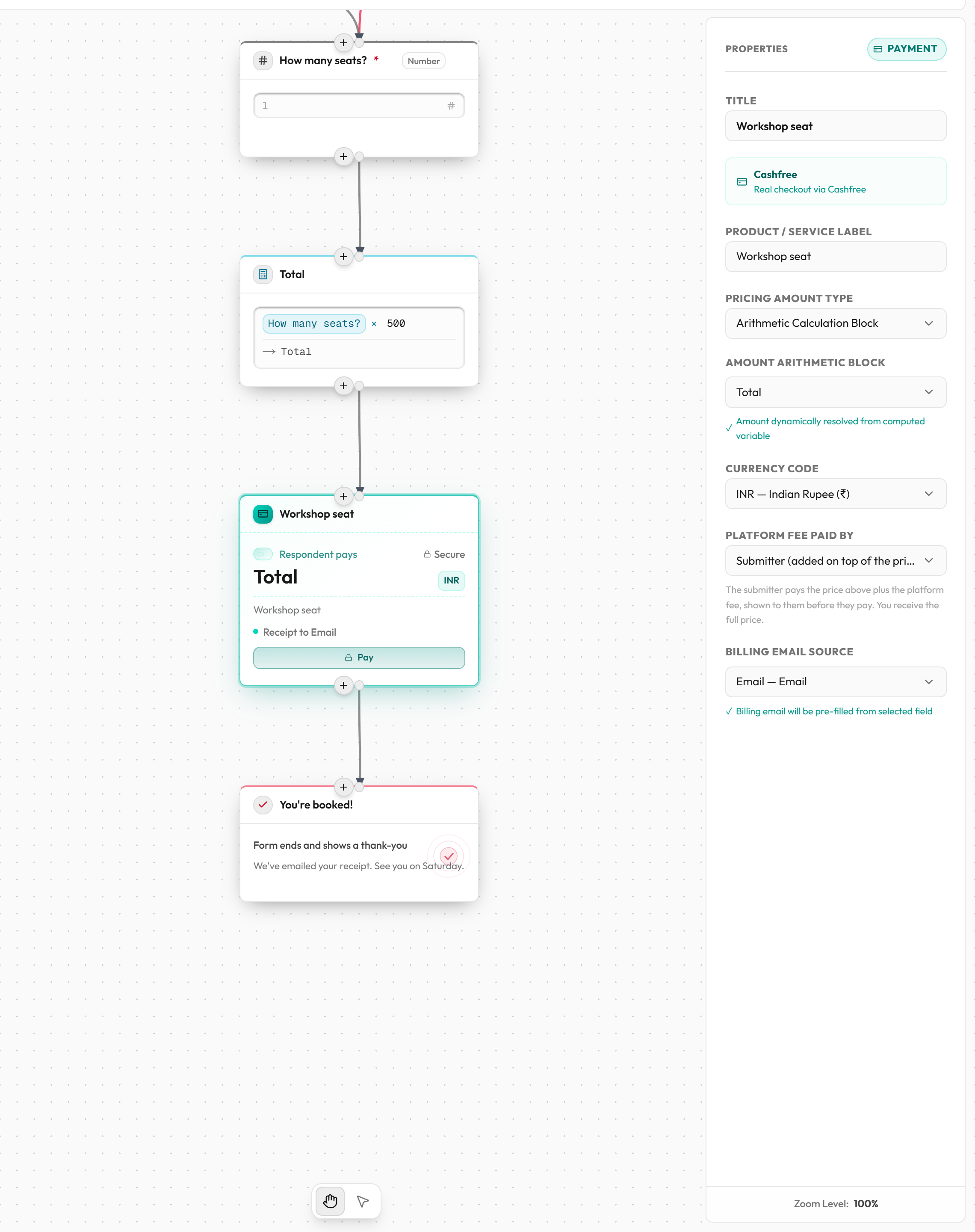
Example: workshop tickets
- Add a Number question "How many tickets?" and an Email question "Your email". Make both required.
- Add a Calculation block: Multiply, Operand A is the tickets question, Operand B is a static value of 500.
- Add a Payment block after it. Set Pricing Amount Type to Arithmetic Calculation Block and pick the Calculation block.
- Set Billing Email Source to "Your email". Someone buying 3 tickets pays 3 × ₹500 = ₹1,500.
Before you publish
You must set up payouts before publishing a form with a Payment block, so the money has somewhere to go. If you haven't, you see "Set up your payouts before publishing a form with a payment step, so the money has somewhere to go." If your payouts are on hold, publishing is also blocked until support releases the hold. See Set up payouts. Preview never charges anyone: payments are marked paid instantly and nothing is saved.
Common mistakes
| Message | What it means | What to do |
|---|---|---|
| Payment amount must be greater than zero. | The fixed amount is 0 or empty. | Enter an amount above 0. |
| Payment description is empty. | The label is blank. | Fill in Product / Service Label. |
| Payment billing source (email field) is not selected. | No billing email question is chosen. | Choose one in Billing Email Source. |
| Payment amount arithmetic block is not selected. | You chose a calculated amount but no Calculation block. | Pick one, or switch to a static amount. |
| Answer is used but optional | The billing email question (or a question the calculation reads) isn't required. | Click Make required. |
| Multiple checkout steps in a single flow path. | Two Payment blocks can be reached one after the other. | Keep one payment per path. |
| Payments are only supported in INR. | The block uses another currency, for example one made before rupees were the only option. | Set Currency Code to INR. |
| Payment step must be outside any loop. | The block is inside a Repeat. | Move it after the Repeat's Next output. |